Introduction
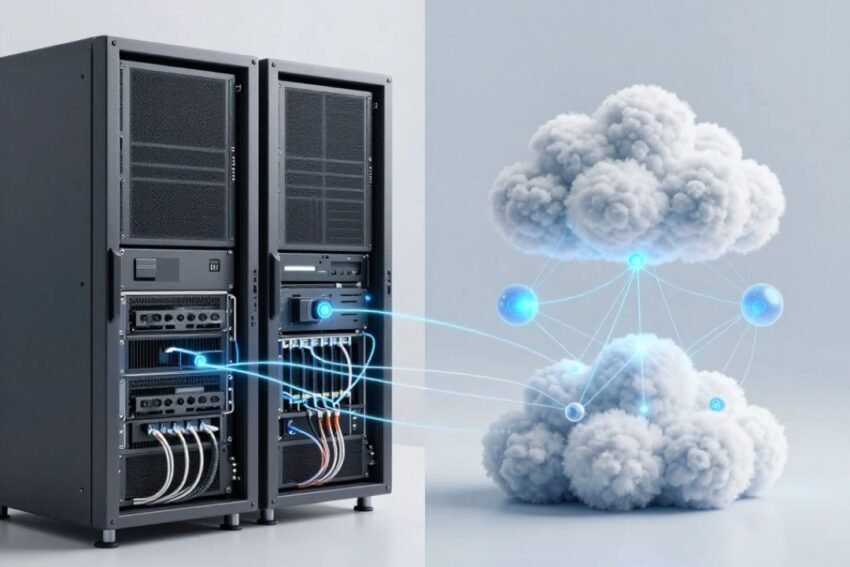
Cloud computing vs traditional IT is an important comparison for businesses moving toward digital transformation. For decades, organizations relied on physical servers, on-site data centers, desktop software, and locally managed infrastructure to run their operations. Today, cloud computing provides an alternative approach that allows businesses to access computing resources over the internet.
Cloud technology has changed how companies manage storage, applications, databases, networking, security, and computing power. Instead of purchasing and maintaining every piece of hardware, organizations can use cloud services based on their requirements.
However, traditional IT has not disappeared. Many organizations continue to use physical infrastructure because of specific security, compliance, performance, or operational requirements.
Understanding the differences between cloud computing and traditional IT can help businesses choose the right technology strategy.
What Is Traditional IT?
Traditional IT refers to an infrastructure model where an organization owns, operates, or directly controls much of its computing hardware and software.
This can include:
- Physical servers
- On-site data centers
- Local storage
- Network equipment
- Desktop applications
- Internal databases
- Backup systems
- IT management teams
Organizations are generally responsible for purchasing hardware, installing software, maintaining equipment, managing updates, and replacing aging infrastructure.
This approach provides significant control but can require substantial investment and technical resources.
What Is Cloud Computing?
Cloud computing provides computing resources through remote infrastructure operated by cloud service providers.
Users can access services such as:
- Virtual machines
- Cloud storage
- Databases
- Networking
- Software
- AI services
- Analytics
- Backup systems
- Development platforms
Instead of owning all the physical infrastructure, businesses can access resources according to their needs.
Cloud computing can be deployed through public, private, hybrid, or multi-cloud models.
Cloud Computing vs Traditional IT: Key Difference
The biggest difference is how computing infrastructure is owned, managed, and delivered.
Traditional IT usually depends on physical infrastructure controlled directly by the organization.
Cloud computing shifts much of the infrastructure management to a cloud provider.
This creates differences in cost, scalability, maintenance, accessibility, deployment speed, and management.
1. Cost Comparison
Traditional IT
Traditional IT usually requires significant upfront investment.
Businesses may need to purchase:
- Servers
- Storage systems
- Networking equipment
- Backup hardware
- Cooling systems
- Physical facilities
They also need to pay for maintenance, upgrades, electricity, and IT staff.
Cloud Computing
Cloud computing generally reduces the need for large upfront hardware investments.
Businesses can pay for cloud resources through subscription or usage-based models.
This can make it easier for startups and smaller organizations to access advanced computing infrastructure.
However, cloud costs can increase if resources are not properly monitored.
2. Scalability
Scalability is another major difference.
Traditional IT infrastructure has a fixed physical capacity.
If a business needs more computing power, it may need to purchase and install additional hardware.
Cloud computing can provide much greater flexibility.
Businesses can increase or decrease resources according to demand.
For example, an online store can scale infrastructure during a major sales event and reduce capacity afterward.
3. Deployment Speed
Traditional infrastructure can take considerable time to deploy.
Organizations may need to purchase hardware, install equipment, configure networks, and set up software.
Cloud platforms can provide computing resources much faster.
Developers can often create virtual servers, databases, and development environments through cloud management interfaces or automation tools.
This can accelerate business innovation.
4. Maintenance
Traditional IT requires organizations to manage physical equipment.
IT teams may need to handle:
- Hardware repairs
- Software updates
- Server maintenance
- Cooling
- Physical security
- Hardware replacements
Cloud providers manage much of the underlying physical infrastructure.
Customers still need to manage their applications, configurations, accounts, and other responsibilities depending on the service.
This can reduce the infrastructure burden on internal IT teams.
5. Accessibility
Traditional IT systems may depend heavily on physical office networks.
Cloud services can often be accessed from different locations when suitable network connectivity and authorization are available.
This makes cloud computing particularly useful for remote and hybrid work.
Employees can access cloud applications, documents, databases, and collaboration tools from different locations.
6. Infrastructure Ownership
Traditional IT generally involves direct ownership of hardware.
Businesses purchase servers, storage devices, networking equipment, and other infrastructure.
Cloud computing uses infrastructure operated by cloud providers.
The organization rents or subscribes to computing resources rather than owning all the physical equipment.
This changes the financial and operational model of IT.
7. Data Storage
Traditional IT stores information on local servers, storage devices, or organization-managed data centers.
Cloud computing stores data in provider-managed infrastructure.
Cloud storage can provide flexible capacity and remote accessibility.
Businesses can also use cloud services for backup and disaster recovery.
Regardless of the model, organizations need strong data protection and access controls.
8. Disaster Recovery
Traditional IT organizations often need to maintain their own backup infrastructure.
This can require additional servers, storage, facilities, and operational planning.
Cloud computing can simplify disaster recovery by providing remote infrastructure and scalable backup options.
Organizations can maintain copies of important systems and data in separate locations.
However, cloud backup does not automatically guarantee successful recovery. Businesses should regularly test their recovery procedures.
9. Security
Security is important in both traditional IT and cloud computing.
Traditional IT Security
Organizations control much of their physical and network infrastructure.
This can provide direct control over security policies and hardware.
However, businesses are also responsible for securing everything themselves.
Cloud Security
Cloud providers invest heavily in infrastructure security, but customers still have important responsibilities.
These can include:
- Identity management
- Password security
- Access controls
- Data protection
- Application security
- Configuration management
The exact responsibilities depend on the cloud service model.
10. Flexibility
Cloud computing generally provides greater infrastructure flexibility.
Organizations can quickly create new resources and adjust existing ones.
Traditional IT can be less flexible because hardware capacity is physically limited.
However, traditional infrastructure may provide more direct control over hardware and specialized systems.
11. Software Updates
Traditional IT organizations often need to manage software updates themselves.
This can require IT teams to schedule maintenance and deploy updates across multiple systems.
Cloud services can simplify updates because many infrastructure components are maintained by the provider.
However, customers may still be responsible for application updates and configuration.
12. Performance
Performance depends on the specific workload and infrastructure design.
Traditional IT can provide highly predictable performance when hardware is dedicated to a particular organization.
Cloud platforms can provide powerful computing resources and scalability.
However, cloud applications depend on network connectivity and may experience performance variations based on workload, configuration, and provider infrastructure.
The best choice depends on application requirements.
13. Business Continuity
Cloud computing can support business continuity by allowing organizations to maintain systems across geographically distributed infrastructure.
If one location experiences a problem, services may be able to operate from another location depending on architecture.
Traditional IT can also support business continuity, but organizations generally need to build and maintain their own redundancy systems.
14. Cloud Computing for Startups
Cloud computing can be particularly attractive for startups.
New companies can access computing infrastructure without purchasing expensive servers.
They can quickly launch websites, applications, databases, and online services.
As the business grows, cloud resources can scale with demand.
This allows startups to focus more on products and customers rather than physical infrastructure.
15. Traditional IT for Large Organizations
Traditional IT can still be useful for certain large organizations.
Some businesses have specialized workloads, legacy applications, or regulatory requirements that make dedicated infrastructure appropriate.
Certain organizations may also prefer direct control over specific systems.
For this reason, many enterprises use a combination of traditional infrastructure and cloud services.
16. Hybrid IT: Combining Both Approaches
The choice does not always have to be cloud versus traditional IT.
Hybrid IT combines different infrastructure models.
A business might use:
- Traditional servers for legacy applications
- Private infrastructure for sensitive workloads
- Public cloud for scalable applications
- Cloud storage for backups
- Edge systems for real-time processing
This approach allows organizations to select infrastructure based on workload requirements.
Cloud Computing vs Traditional IT Comparison
Feature
Cloud Computing
Traditional IT
Infrastructure
Provider-managed
Organization-managed
Upfront Cost
Generally lower
Generally higher
Scalability
Highly flexible
Hardware-dependent
Deployment
Faster
Usually slower
Maintenance
Shared responsibility
Mostly organization-managed
Accessibility
Remote access possible
Often infrastructure-dependent
Hardware Ownership
Usually provider-owned
Organization-owned
Disaster Recovery
Flexible cloud options
Requires dedicated planning
Flexibility
High
More limited
Physical Control
Lower
Higher
Internet Dependence
Often significant
Can be lower for local systems
Advantages of Cloud Computing
Cloud computing offers several important benefits.
Scalability
Resources can be adjusted according to demand.
Cost Flexibility
Organizations can avoid some large hardware investments.
Faster Deployment
Cloud resources can be provisioned quickly.
Remote Accessibility
Employees can access cloud applications from different locations.
Innovation
Businesses can quickly experiment with AI, analytics, databases, and other technologies.
Global Infrastructure
Cloud providers can offer infrastructure across multiple geographic regions.
Advantages of Traditional IT
Traditional IT also has important benefits.
Direct Control
Organizations have greater control over physical infrastructure.
Predictable Environment
Dedicated hardware can provide predictable performance for certain workloads.
Local Operation
Some systems can operate without depending heavily on external cloud services.
Specialized Hardware
Organizations can build infrastructure specifically for unique applications.
Legacy Compatibility
Traditional infrastructure may be easier to maintain for older applications that were not designed for cloud environments.
Disadvantages of Cloud Computing
Cloud technology also has potential drawbacks.
Recurring Costs
Long-term cloud usage can become expensive without proper management.
Vendor Lock-In
Moving workloads between providers can sometimes be difficult.
Connectivity Requirements
Many cloud services depend on reliable network connections.
Configuration Risks
Poorly configured cloud environments can create security problems.
Complexity
Multi-cloud and hybrid environments can require specialized expertise.
Disadvantages of Traditional IT
Traditional IT has several challenges as well.
High Initial Investment
Businesses need to purchase hardware and infrastructure.
Maintenance Costs
Hardware requires regular maintenance and replacement.
Limited Scalability
Increasing capacity often requires purchasing additional equipment.
Longer Deployment
Installing physical infrastructure can take time.
Facility Requirements
Organizations may need dedicated space, power, cooling, and physical security.
Cloud Computing and Artificial Intelligence
AI is one reason many businesses are moving toward cloud platforms.
AI workloads can require significant computing power.
Cloud infrastructure provides access to scalable resources and specialized services.
Organizations can use cloud AI for:
- Business analytics
- Customer support
- Automation
- Software development
- Fraud detection
- Forecasting
- Recommendation systems
This makes cloud computing an important foundation for modern AI adoption.
The Future of IT Infrastructure
The future of IT is unlikely to be completely cloud-only or completely traditional.
Instead, businesses are likely to use a combination of technologies.
Cloud computing, private infrastructure, edge computing, AI, and advanced networking can work together.
Organizations will choose the right environment based on:
- Cost
- Security
- Performance
- Compliance
- Scalability
- Application requirements
- Business strategy
This approach provides greater flexibility than relying on a single infrastructure model.
How to Choose Between Cloud and Traditional IT
Businesses should consider several questions before choosing an infrastructure strategy.
What Is the Workload?
Applications with highly variable demand may benefit from cloud scalability.
How Sensitive Is the Data?
Highly sensitive workloads may require specialized security and compliance controls.
What Is the Budget?
Organizations should compare both initial and long-term costs.
How Quickly Must Infrastructure Scale?
Businesses experiencing rapid growth may benefit from cloud flexibility.
What Are the Connectivity Requirements?
Applications requiring constant network access need reliable connectivity.
Are There Legacy Systems?
Older applications may need traditional or hybrid infrastructure.
Conclusion
The comparison of cloud computing vs traditional IT shows that both approaches have advantages and disadvantages.
Traditional IT provides direct infrastructure ownership, control, and predictable environments for certain workloads. However, it can require significant upfront investment, maintenance, and physical infrastructure management.
Cloud computing provides scalability, flexibility, faster deployment, remote accessibility, and access to advanced technologies such as AI, analytics, and automation.
For many organizations, the best strategy is not to choose one model exclusively. Hybrid IT and multi-cloud approaches can combine the strengths of different environments.
As businesses continue their digital transformation, cloud computing will play an increasingly important role. However, traditional infrastructure will remain relevant for specific workloads and requirements.
Ultimately, the right technology strategy depends on the organization’s goals, budget, security needs, applications, and future plans. The most successful businesses will be those that use cloud and traditional IT strategically to build secure, scalable, flexible, and efficient digital infrastructure.